
The AI Dev Squad: How to Build a Team of 5 AI Agents That Runs Your Dev Workflow
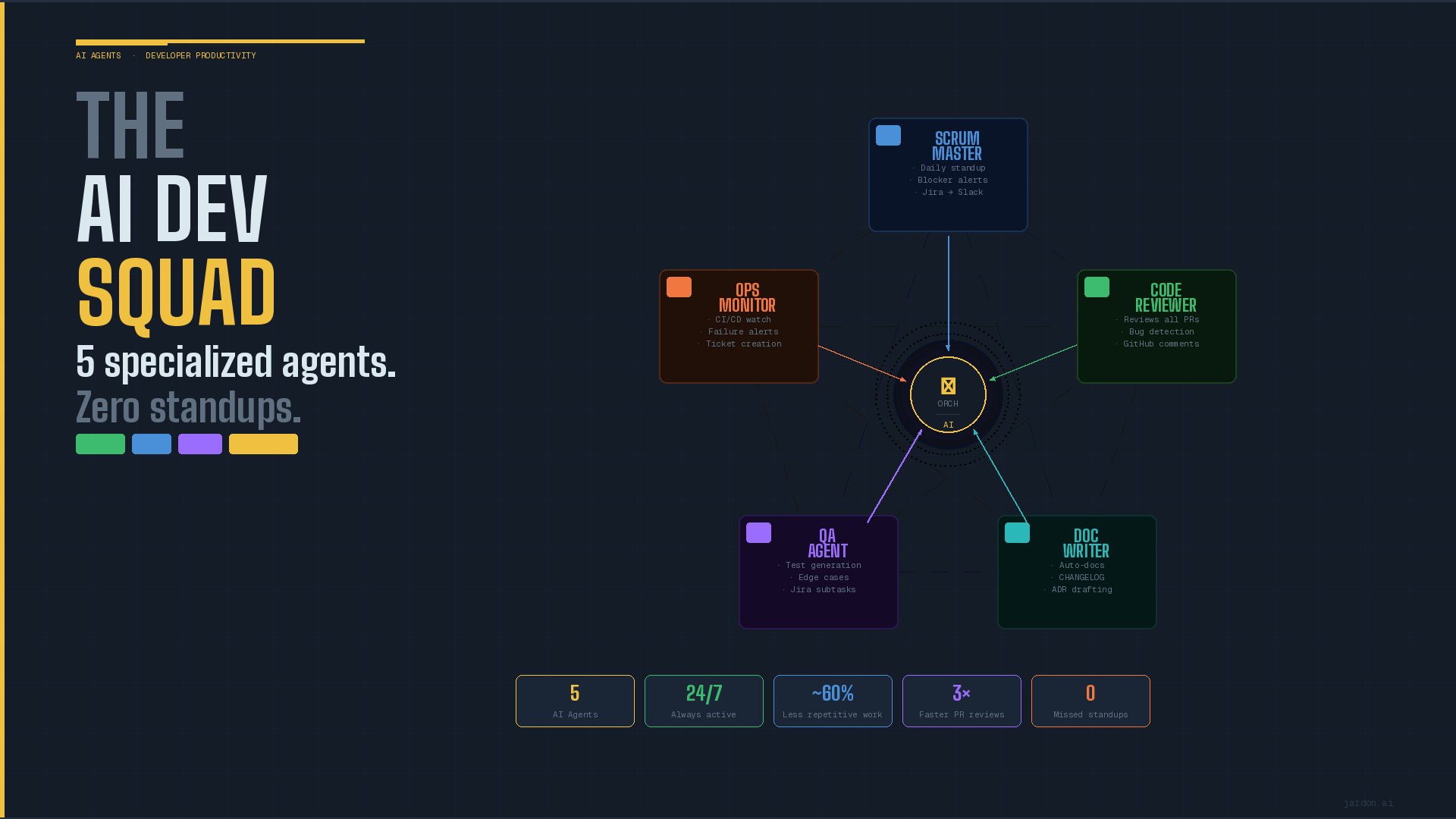
What if your team had a Scrum Master that never missed a blocker, a Code Reviewer that read every PR in 30 seconds, a Doc Writer that never fell behind, a QA Agent that generated tests from user stories, and an Ops Monitor that never slept? This is not a thought experiment. Here's how to build it.
One of the dreams in a career ladder in corporate and government sector is having more responsabilities. And this usually happens after a few years. In Software development you start in entry level with few responsibilities, moving no risky code, still having time to chill out. If you are lucky enough and a hard worker, you wake up a few years later having a team reporting to you. This is everyone's dream right? The dark side is on your daily tasks. Usually you will have an agenda where meetings start to overlap and you have to split you attention on a lot of diverse activities. Team building, team growing, production support, meetings, coffee break, meetings, daily standups, other areas issues, and so on. This doesn't sound like very productive right? Is there a way to improve this?
Every engineering team I've worked with has the same hidden productivity drain. It's not the hard problems, complex architecture decisions, difficult bugs, performance challenges. Those get attention and energy. The drain is the invisible tax of repetitive, low-value work: writing the same standup update from Jira tickets, reviewing a PR that nobody has time for, updating documentation that nobody reads because it's always outdated, writing boilerplate unit tests for a CRUD endpoint, creating the same incident ticket at 7.30 am with the same format. No value added on these activities. No human intellingence required, just waste of time and energy.
This is where Agents enter the scene. One of the key promises of AI is to help us improve our daily life activities. We use agents to automate home activities, suggestions for music or shopping, reminders for activities and so on. So why not apply the same principles to simplify these boring activities and free up out time to dedicate to those more value tasks? To do so, in these series of posts, we'll build The AI Dev Squad , a team of 5 specialized AI agents that run your development workflow autonomously, freeing your engineers to focus exclusively on the work that actually requires them.
This first post covers the global architecture: why 5 agents, how they're structured, how they communicate, and the guardrails that prevent them from becoming a liability instead of an asset.
Why 5 Specialized Agents Instead of One General Agent?
The first design question when building agentic systems is always: one generalist, or multiple specialists? The answer in engineering contexts is almost always specialists. A single agent given access to GitHub, Jira, and Slack with instructions to "help the dev team" will produce mediocre results across all tasks. "Don't bite more than you can chew" is not just a phrase, but also a requirement for AI agents. A single agent lacks context, lacks focus, and lacks clear boundaries, which is exactly the combination that leads to the kind of incident we covered a few weeks ago. On the other hand specialized agents are:
- Better at their task. Their system prompt, tool access, and memory are all scoped to one job.
- Safer. A code review agent has no business touching Jira priorities, a scrum agent has no business touching code.
- Easier to debug. When something goes wrong, you know exactly which agent and which action.
- Independently improvable. You can upgrade one agent without touching the others.
Meet the team
Agent 01. The Scrum Master.
- Trigger Event. Every morning at 9am, or on-demand via Slack
- Tools. Jira API (read), Slack API (write)
- Responsibilities.
- Reads all open tickets in the current sprint.
- Identifies tickets with no activity in the last 48 hours (blockers)
- Checks for tickets assigned to the same person for more than 3 days (capacity risk)
- Generates a structured standup summary and posts it to the team Slack channel
- Tags the relevant engineers for action items
- Benefits. What used to be a 30-minute standup that nobody wanted to attend becomes a 2-minute Slack read that everyone actually absorbs. The daily standup becomes productive and short with specific actions: focus on the blockers, check capacity, identify who needs help and jump in to give them a hand.
Agent 02. The code reviewer
- Trigger. New PR opened on GitHub
- Tools. GitHub API (read/comment), Slack API (write)
- Responsibilities.
- Reads the PR diff and description within seconds of creation
- Checks for: code style violations, potential bugs, security issues, test coverage gaps, missing documentation
- Posts structured review comments directly on the PR
- Posts a summary to the dev Slack channel with a severity rating
- Never approves or merges, humans do that
- Benefits. Every PR gets a first review before any human has opened it. Don't waste time on repetitive tasks on code style and violations, basic bugs or security issues. Human reviewers spend their time on architecture and business logic.
Agent 03. The Doc Writer
- Trigger. Merge to main branch
- Tools. GitHub API (read/write), Jira API (read)
- Responsibilities.
- Reads the merged diff and the linked Jira ticket
- Updates the relevant README section or API documentation
- Generates or updates the CHANGELOG entry
- If the change introduces a new architectural decision, drafts an Architecture Decision (AD)
- Benefits . Documentation is always current. Always. For the first time in your team's history and at least someone is reading and writing it.
Agent 04. The tester
- Trigger. Jira ticket moved to "In Development"
- Tools. Jira API (read), GitHub API (write)
- Responsibilities.
- Reads the user story, acceptance criteria, and technical context
- Generates a test plan: happy path, edge cases, error cases
- Writes boilerplate unit test stubs in the correct test file
- Creates a Jira subtask with the full test checklist
- Benefits. Engineers start development with tests already drafted. The QA Agent doesn't write the final tests, it writes the template and basic tests that makes writing tests faster. Much faster.
Agent 05. The monitor
- Trigger. GitHub Actions failure, or scheduled health check every 15 minutes
- Tools. GitHub API (read), Jira API (write), Slack API (write)
- Responsibilities.
- Monitors CI/CD pipeline status
- On failure: analyzes the error logs, identifies the likely cause, creates a Jira bug ticket pre-filled with context, notifies the responsible engineer on Slack with a plain-English summary
- On recurring failures: escalates to team lead with trend analysis
- Benefits
- The engineer who broke the build gets a Slack message, and owns the fix. No hunting through CI logs. He also has to invite the next round of coffees.
The Architecture.
The agents are not isolated. They share context through a central Orchestration Layer. A lightweight coordinator that:
1. Routes triggers to the right agent (a new PR goes to Agent 02, a Jira status change goes to Agent 04)
2. Shares context between agents (Agent 02's code review informs Agent 04's test generation)
3. Maintains audit logs of every agent action
4. Enforces rate limits so agents don't spam your tools
class DevSquadOrchestrator:
    def __init__(self):
        self.agents = {
            "scrum_master":   ScrumMasterAgent(),
            "code_reviewer":  CodeReviewerAgent(),
            "doc_writer":     DocWriterAgent(),
            "qa_agent":       QAAgent(),
            "ops_monitor":    OpsMonitorAgent(),
        }

    def route(self, event: dict):
        """Route an incoming event to the appropriate agent."""
        event_type = event.get("type")

        routing = {
            "jira.sprint_start":      "scrum_master",
            "github.pull_request":    "code_reviewer",
            "github.push.main":       "doc_writer",
            "jira.ticket.in_dev":     "qa_agent",
            "github.actions.failure": "ops_monitor",
        }

        agent_name = routing.get(event_type)
        if not agent_name:
            return {"status": "unrouted", "event": event_type}

        agent = self.agents[agent_name]
        result = agent.handle(event)

        # Log every action for audit trail
        self.log_action(agent_name, event, result)
        return result

    def log_action(self, agent: str, event: dict, result: dict):
        """Every agent action is logged with full context."""
        print(f"[AUDIT] {agent} | {event['type']} | {result['status']}")
Each agent follows the same base pattern. A system prompt that defines its role and boundaries, a set of tools scoped to its minimum required permissions, and a structured output format.
class CodeReviewerAgent:
    SYSTEM_PROMPT = """
    You are a senior code reviewer for a software engineering team.
    Your job is to review pull requests on GitHub and post structured feedback.

    You MUST:
    - Review only the changed files in the PR diff
    - Post comments directly on the relevant lines
    - Rate overall PR quality: APPROVED / NEEDS_WORK / CRITICAL

    You MUST NOT:
    - Approve or merge pull requests
    - Modify any files in the repository
    - Access any branch other than the PR branch
    - Comment on tickets, Slack, or any system other than GitHub
    """

    def handle(self, event: dict) -> dict:
        pr_data = self.fetch_pr(event["pr_number"])
        response = client.messages.create(
            model="claude-sonnet-4-6",
            max_tokens=2000,
            system=self.SYSTEM_PROMPT,
            messages=[{
                "role": "user",
                "content": f"Review this PR:\n\n{pr_data['diff']}\n\nDescription: {pr_data['description']}"
            }]
        )
        review = self.parse_review(response.content[0].text)
        self.post_github_review(event["pr_number"], review)
        return {"status": "reviewed", "rating": review["rating"]}
The guardrails.
Five agents with access to your GitHub, Jira, and Slack require a security-first design. Three rules that are not optional, and no limitative.
Rule 1. Read-mostly
Agents 01 and 04 read Jira but only write comments and subtasks. They cannot change ticket priorities, reassign tickets, or modify sprint scope. Agent 02 can post GitHub comments but cannot approve or merge. Agent 03 can open PRs with documentation updates, a human must merge them (yes we are safe, engineers will be the gatekeepers). Agent 05 creates Jira tickets but cannot close, modify, or delete them.
Rule 2. No production access. Ever.
None of these agents have credentials to production environments, databases, or deployment pipelines. The Ops Monitor reads GitHub Actions logs it does not have the ability to trigger deployments, rollbacks, or infrastructure changes. This is a hard architectural constraint, not a configuration option.
Rule 3. Every action is logged and reversible.
Every ticket created, comment posted, or document updated by an agent must be tagged with [AI-AGENT] in the title or a custom field. Engineers can search, audit, and override any agent action. If an agent posts a bad code review, the engineer can delete it in one click. If the Doc Writer generates incorrect documentation, the PR can be closed without merge.
What's Next?
Over the next four weeks we'll go deep on each agent, the exact prompts, the tool integrations, the failure modes, and the code you need to deploy them:
- May 15. The Scrum Master, automating your daily standup with Jira.
- May 22. The Code Reviewer, reviewing every PR before any human does.
- May 29. The Doc Writer and tester, documentation and tests on autopilot.
- June 08. The monitor, how to keep your squad safe.
The goal is not to replace your engineering team. It is to give every engineer on your team five tireless collaborators that handle the repetitive work, so they can focus on the work only they can do. Hopefully at the end of this series, you'll recover the passion, and time, and moreover the excitement on performing your daily tasks and help you on boosting your productivity.
Sources
- Anthropic. Claude API Documentation.
- Atlassian. Jira REST API.
- GitHub. REST API Documentation
- Slack. Bolt SDK for Python
- Weng, L. (2023). LLM Powered Autonomous Agents
- Kim, G. et al. (2016). The DevOps Handbook. IT Revolution Press.