
Agent 001: The Scrum Master
Your daily standup takes 30 minutes and produces a 90-second summary that nobody reads. Here's how to build an AI agent that reads your entire Jira sprint every morning, detects blockers automatically, and posts a structured report to Slack, before you even blink your eyes.
I remember daily standup meetings back in the early 2010's. I had the opportunity to participate in one of the teams that adopted this practice in the company. We managed to find a meeting room and paste some post-its in the whiteboard. Every morning, with the participation of that pilot team we performed our daily meeting answering the classic three questions and updated manually the status of the sprint. Then the scrum master updated the burn-down chart. A lot of curious eyes spotted to check what was happening there. Ah the old times.
Then after a few years and with the regular adoption of agile methodologies pretty much in the whole banking industry, everyone performs agile without really questioning how to improve some of the repetitive activities, avoiding the constant progression of the team's performance. That's pretty much anti-agile.

The daily standup was designed for co-located teams in the 1990s. Fifteen people standing in a circle, each spending two minutes answering three questions. The format made sense when the information lived in people's heads. Since then a lot has changed, including some of the most misused tools as Jira.
Every ticket has a status, an assignee, a last-updated timestamp, and a comment history. Everything you say in a standup is already there.
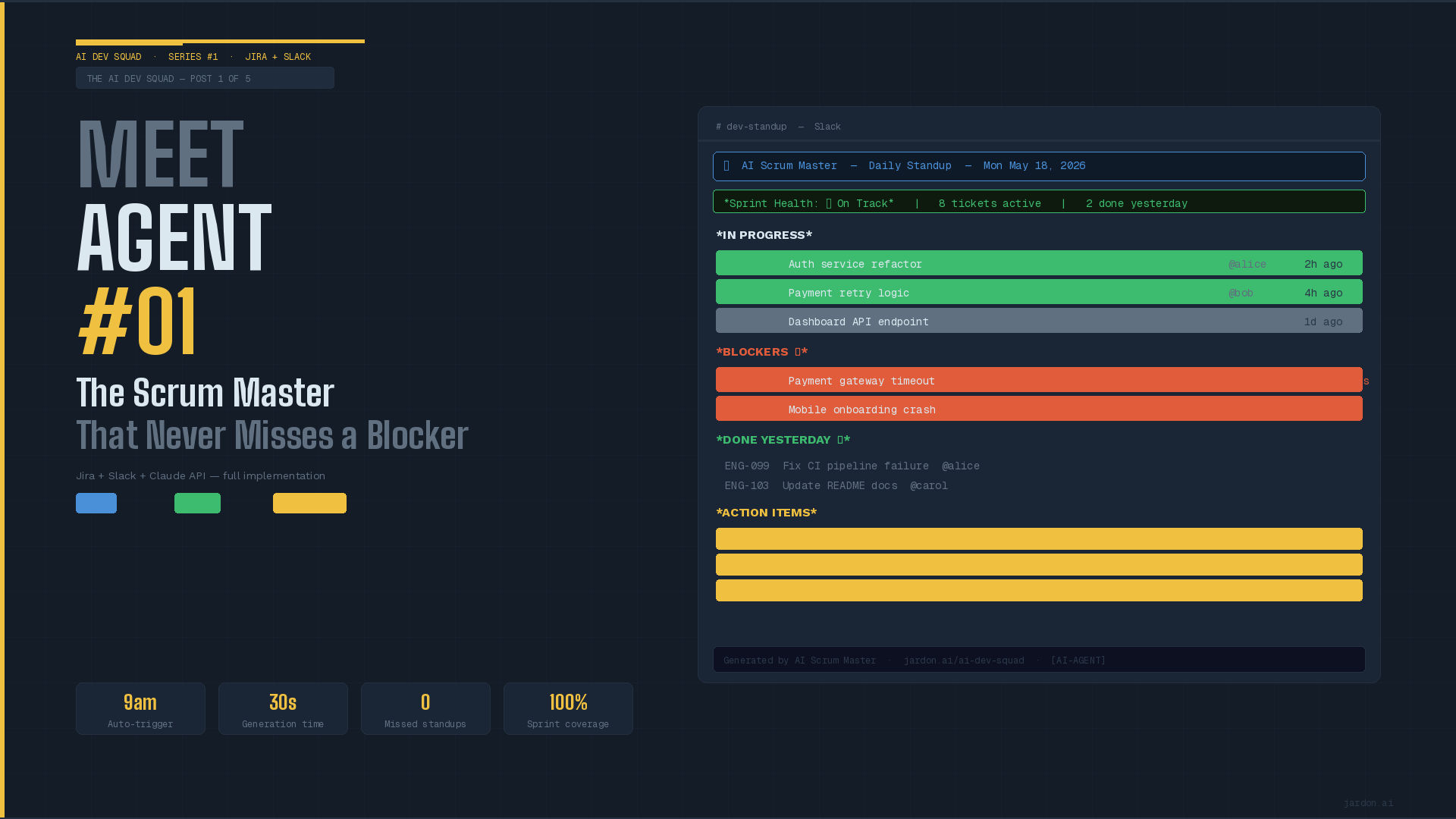
Meet the first agent: The Scrum Master Agent. First thing in the morning, it reads your entire Jira sprint, identifies blockers, flags risks, summarizes progress, and posts a structured report directly to your favorite communication tool in under 30 seconds. Your team reads it once they go online. Your daily meeting will focus on the issues and blockers.
What this agent does
The agent runs on a daily schedule, here is the workflow.
- Fetch the active sprint in Jira.
The agent queries the Jira using an API for all tickets in the current sprint. Get the status, assignee, priority, last activity timestamp and comments.
- Classify each ticket
Each ticket is identified as active (last updated in the last 24 hrs), stale (no activity in the last 48+ hrs), critical (no activity in the last 72+ hrs), done
Be creative, this is a suggestion based on a 2 week sprint.
- Generate the report
The classified tickets are sent to your favorite LLM using a structured prompt. The agent will generate a plain text in a markdown format tagging the assignees to flag the blockers.
- Post to your communication tool
To identify the message use a tag such as ''[AI-AGENT]'
- Log the actions.
Full audit record: timestamp, ticket count, blockers detected, channel used, model used
The prompt
This is the most important part for the agent. It defines what the agent is, what can do, and mostly, what cannot do. This is not limitative.
SYSTEM_PROMPT = """
You are an AI Scrum Master for a software engineering team.
You receive structured Jira sprint data and generate a daily
standup report for the team Slack channel.

Your report MUST follow this structure:
1. SPRINT HEALTH: ✅ On Track / ⚠️ At Risk / 🚨 Off Track + justification
2. IN PROGRESS: tickets actively worked (updated < 24h)
3. BLOCKERS: tickets with no activity 48h+ (flag with ⚠️)
4. DONE YESTERDAY: tickets moved to Done since last report
5. ACTION ITEMS: specific @mentions with concrete asks

Rules: Slack markdown, under 400 words, factual only.
NEVER invent ticket details.
NEVER suggest reassignments.
NEVER comment on individual engineer performance.
"""
The explicit list of prohibited behaviors is not optional. It is what keeps the agent inside its lane.
Ticket classification
Before the LLM sees anything, we classify every ticket programmatically. We want deterministic classification rules, not a language model deciding what counts as a blocker.
# Hours since last activity
hours_stale = (now - last_updated).total_seconds() / 3600

# Explicit blocker by the assignee
is_blocker = "blocked" in labels or "impediment" in status.lower()

# Classification, feel free to update as needed
if "done" in status.lower() and hours_stale < 24:
    done_since_yesterday.append(ticket)
elif is_blocker or hours_stale >= 72:
    critical.append(ticket)
    # you could create your escalation mechanisms
elif hours_stale >= 48:
    stale.append(ticket)
    # needs attention today, let's discuss in the daily standup
else:
    active.append(ticket)        # healthy
This structured approach reduces hallucination risk and makes the output more predictable and understandable by the team.
Sending to the LLM
For sending the data to the LLM we will use the infamous JSON format to avoid any potential anarchical free-form text. A structured payload will give the LLM what it needs, no less, no more.
payload = {
    "sprint_name":    "Sprint XXX — Payment Gateway",
    "days_remaining": 4,
    "date":           "Monday, June 8, 2026",
    "active_tickets": [
        {
            "key":      "TCK-101",
            "title":    "Auth service refactor",
            "assignee": "alice",
            "hours_since_update": 8.5,
        }
    ],
    "stale_tickets": [
        {
            "key":      "TCK-102",
            "title":    "Payment gateway timeout",
            "assignee": "dave",
            "hours_since_update": 72.3,
            "is_explicitly_blocked": True,
        }
    ],
    "done_yesterday": [
        {"key": "ENG-099", "title": "Fix CI pipeline", "assignee": "alice"}
    ],
}

response = client.messages.create(
    model="claude-sonnet-4-6",
    max_tokens=800,
    system=SYSTEM_PROMPT,
    messages=[{
        "role":    "user",
        "content": f"Generate standup report:\n\n{json.dumps(payload, indent=2)}"
    }]
)
What the LLM produces
The expected output from the LLM is something as follows.
Sprint Health: ⚠️ At Risk
Sprint 42 has a Critical blocker on TCK-102 with no update in 72 hours.
IN PROGRESS
• 'TCK-101' Auth service refactor — @alice (8h ago)
• 'TCK-104' Payment retry logic — @yorch (12h ago)
BLOCKERS ⚠️
• 'TCK-102' Payment gateway timeout — @dave — no update for 72h
• 'TCK-106' Mobile onboarding crash — @gonx — no update for 51h
DONE YESTERDAY ✅
• 'TCK-099' Fix CI pipeline — @zelt
ACTION ITEMS
• @dave please update TCK-102 status, blocker is 3 days old, sprint at risk
• @zelt share blocker details on TCK-106 by EOD
• @yorch TCK-107 last updated 24h ago — still active?
This will be posted to your favorite communication tool, always available for tracking and visibility. Also be creative, you could add the link to the specific tickets.
The guardrails
The access of this agent should be read-only to Jira. It can query tickets, sprint metadata, comments and that's it.
It cannot do:
- Modify ticket status, assignee and priority
- Create, close or delete tickets
- Change sprint scope or dates (ohh those KPIs)
- Access any other project to the configure one
On your communication tool:
- Send direct message to the team members, all should be visible
- Post to other channels
- Read message history
- React or delete messages
The execution
For running this agent could go with:
- Cron job
- Github actions
- Manual
Edge cases
As everything, there can be some cases where things go wrong. Some of the cases could be:
- No active sprint found. Check if there is any active sprint, if none, skip the execution a define a re-execution policy.
- Unassigned tickets. What is going on team? Also define if a message should be posted to the channel
- API timeout. Some Jira maintenance? This is very common, Log the error and jump into the retry policy.
- LLM unexpected generation.
Budget under control
It's all about efficiency and money. We don't want to waste a penny in a very basic agent right? Let's avoid those stories about thousands of dollars. Here are some additional recommendations.
1. Pre-filter before you prompt
The single most effective cost control is sending less data to the model. In this agent, we classify tickets programmatically and send only the relevant structured summary. Strip everything the model doesn't need before the API call.
2. Cap your input tokens explicitly
Truncate ticket titles, comments, and descriptions before including them in the prompt. A 4,000-word ticket description adds tokens and rarely adds useful signal. Set a hard character limit per field and enforce it before serializing to JSON.
3. Set 'max_tokens' as tight as possible
The model can't bill for tokens it doesn't generate. For a standup report that must stay under 400 words.
4. Use the right model for the task
Not every task needs the most powerful and expensive model available. A standup report from structured JSON is a formatting and summarization task, it doesn't require frontier reasoning. Use your provider's fastest mid-tier model for scheduled, repetitive tasks. Reserve the flagship model for agents that need deep code analysis or complex reasoning.
5. Cache aggressively where input is stable
If your sprint data hasn't changed since the last run, there's no reason to call the model at all. A simple hash of the sprint payload compared to yesterday's hash can skip the API call entirely on quiet days.
6. Batch where possible, schedule wisely
Running at 9am local time instead of UTC midnight means you run once, at the right time, with the full day's Jira activity captured. Avoid running agents more frequently than the cadence of the underlying data.
7. Log token usage and set alerts
Every major LLM provider returns token counts in the API response. Log them. Set a monthly budget alert.
And my scrum master
This agent automates the information-gathering and reporting part of the Scrum Master role. It does not automate the Scrum Master role itself. The distinction matters, both for setting expectations with your team and for designing a healthy human-AI collaboration.
Here is what a human Scrum Master continues to own, and why no agent should touch it.
- Conflict resolution and team dynamics. The agent can flag that @dave hasn't updated TCK-102 in 72 hours. It cannot know that Dave is dealing with. Human judgment about people, their context, is irreplaceable. The agent surfaces the signal; the Scrum Master reads the situation.
- Sprint planning and scope decisions. Deciding what goes into a sprint, how much capacity the team has, and what gets cut when scope creep hits requires business context, stakeholder relationships, and strategic judgment. The agent has no visibility into roadmap priorities, client commitments, or organizational constraints. Sprint planning remains entirely human.
- Retrospectives and continuous improvement. The Scrum master facilitates retrospectives. This requires psychological safety, facilitation skill, and the ability to surface uncomfortable truths constructively. An agent can generate a data summary of the sprint; it cannot create the conditions for a team to be honest with each other.
- Escalation judgment. The agent flags a blocker and generates an @mention. The human Scrum Master knows how to escalate, the tone, the channel, the urgency. This requires reading the organizational context that no structured JSON payload can capture.
- Stakeholder communication. Reporting sprint status to product managers, executives, or clients requires framing, context, and political awareness. The agent produces an internal standup for the engineering team. External communication stays human.
Think of the AI Scrum Master agent as a junior analyst who shows up every morning having already read all of Jira, organized the information, and prepared a briefing. The agent handles the information. The human handles everything else.
Phew this one longer than I expected, and it was one of the easiest one. Next week we will build The Code reviewer. Please feel free to contact me for the full sample code.
SOURCES & REFERENCES
- Anthropic — Claude API Documentation
- Atlassian — Jira REST API v3
- Slack — Bolt SDK for Python
- GitHub — Full source code: ai-dev-squad
Annex
The system prompt we use for the Scrum Master Agent is not arbitrary. Every structural decision reflects a hard-learned principle about how language models behave in production. Here is a breakdown of what makes it work — and what would break if you changed it.
- Specific role definition
- Declared input format
- Numbered output structure
- Explicit thresholds
- Medium-specific formatting
- Exhaustive NOT TO DO list
- Implicit tone via role